
×

 What happens when the experienced staff who know legacy systems retire?
Legacy systems have been the backbone of industries for several decades, running critical operations. But gradually they are becoming liabilities. The experts who have been managing these legacy systems are retiring, taking away the skills and knowledge with them. This has led to a declining legacy IT skills shortage due to the rising gap between the professionals who understand the legacy infrastructure and critical workloads operating on them. The skilled experts are retiring faster than their replacements are trained. This results in slower resolution, longer outages, undocumented dependencies, and rising costs. All because the knowledge was never documented when the experts retired.
 Article


Let us say it is midnight; an alert is sent across the organization that the system that has been running payroll or billing for more than 20 years has stopped. And the engineer who was maintaining it retired a couple of years ago. And the new on-call engineer is still struggling with the legacy systems. So, this results in operational disruptions and calls for premium legacy services.
The system is still running core business operations, but the tribal IT knowledge that explains it is not. It is not the missing tools or lack of budget but the gap between the expertise that keeps the business alive and people who have an understanding of their behavior. This is the quiet face of the legacy IT skills shortage.
Before looking into the legacy systems particularly, it is better to first understand how the hiring market sits. It is getting difficult to find skilled IT personnel right now. According to the Staffing Industry Analysts (SIA) survey of nearly 3800 employers across 41 countries, 76% of them struggle with finding the skilled talent they need for their business.
This is an important factor in the legacy IT skills shortage, as legacy skills are not competing on the same level. Today, most of the hiring pressure is about popular, in-demand skills like AI, cloud, robotics, and more, while employers struggle to fill those roles. This makes legacy systems a smaller and less visible niche, so finding someone who understands an older architecture is harder. If an organization is already struggling to hire for a mainstream skill, then you can imagine the challenges of hiring someone for a skill set that very few people train for.
The next challenge that comes is the pipeline. Skills like these are mostly learned by working next to someone who is already an expert. Simply following a textbook will not make you a pro.
Now if you put these two together, the risks become clearer. Experienced legacy experts are retiring, and their replacements are the new experts who are more proficient in modern technologies than legacy ones. This is how a legacy IT talent shortage forms quietly, not through a dramatic event but because of the gap created between those who are leaving and those who are prepared to take over.
Retirees don’t just walk out of the door. They take away the practical tribal knowledge with them. In other words, manuals stay behind when the expert retires, but the memory does not.
Experienced engineers carry more than just technical skills. They carry context, the reason behind decision-making, system habits, and the lessons learned from years of managing the legacy systems. These contexts are rarely documented, as they never really felt like something that needed to be captured. It is simply how things work.
So, here is a table showing the difference between what an organization keeps and what it risks losing:
| Documented (Manual) | Lives Only in Memory of Experts |
|---|---|
| High-level architecture diagrams | Workarounds that were never formalized, such as “never restart that job before the batch finishes” |
| Standard runbooks | The actual thoughts behind design decisions made 15 to 25 years ago |
| Vendor support contracts | Unwritten schedules, hidden dependencies, and known failure patterns |
| Source code (sometimes incomplete) | Informal peer and vendor contacts who know the real quirks |
This is the core of legacy system dependency on employees. Once that person leaves, the organization is left with a system that continues to run yet carries a clear legacy system expertise risk that only surfaces with the first non-standard incident.
The new IT professionals are chasing the modern stacks. Most career advice points towards the same crowded areas like AI, cloud-native, security, and more. They seem like a rational choice, but there is also a quieter opportunity sitting in plain sight. Yet, critical knowledge of legacy systems is becoming scarce and one of the most valuable skill sets available. The people who learn it are now becoming highly valuable.
The organizations that understand and capture this knowledge early get an advantage that late movers cannot achieve. The legacy system skill shortage is not a theory but a visible challenge that makes the organization dependent. People with legacy expertise can migrate on their own timeline, choose to modernize in phases, and keep the systems stable while running without any interruptions.
It is the real effect of the aging IT workforce legacy systems trend. It does not announce itself but shows during an emergency.
The US GAO reports have identified 10 critical federal legacy systems that range from 8 to 51 years old. They cost around $337 million a year to operate and maintain. Survey reports show that businesses spend up to 80% of their annual IT budget on legacy system maintenance and keeping them operational.
Here are some real-life incidents showcasing what happens when legacy experts retire or move on. They show how these aging infrastructures behave under stress and why it is important to have people who understand them deeply:
In 2020, the claims spiked in several US states that relied on outdated COBOL mainframes. Connecticut described it as a 40-year-old system built on a COBOL mainframe with four separate systems. This surge exposed that only a few are left who could operate on such systems and repair them. (Source: FOX61 News)
A damaged database file in the FAA’s NOTAM system resulted in a complete shutdown. It led to a halt in flight departures for around 90 minutes. This resulted in 1300 flight cancellations and nearly 10000 delays. According to reports, the system was around 30 years old. The system was having issues since the previous night, and technicians switched to backups. But the backup held some corrupt files. This incident is a reminder that a disaster recovery (DR) plan fails when nobody understands the systems they need to manage. (Source: NPR and Fortune)
Southwest Airlines’ scheduling tool, SkySolver, was overwhelmed by the weather-induced task and broke down. It is an outdated infrastructure that couldn’t scale up during the crisis due to its architectural limitations. This resulted in manually sorting the records and severely disrupting operations. Later, the US Department of Transportation issued a $140 million penalty. (Source: ITPro.)
Here are the top 4 common reasons that organizations tell themselves as to why they failed:
Here is a questions checklist that you can run to better understand their legacy system dependency
Here are some significant steps to be taken to prevent legacy system dependency on employees:
Structured knowledge documentation while the expert is still present in the organization.
The pairing of retiring experts and newer staff for a better-defined transition. While working side by side, the new staff will understand the “why” behind the system, and this will help in better understanding of the processes. It results in a cleaner and less stressful handover.
Minimizing aging hardware dependency through legacy modernization to extend the life of critical workloads without expensive rewrites or full system migration.
Planning the next steps in stages will help in making better-informed decisions. Whether you plan to complete migration or keep the critical apps, phased migration helps in ensuring operational continuity.
Legacy hardware was once the groundbreaking technology that ran critical workloads for several decades. They have now become a liability over time. They have reached their end-of-life, and their vendors have stopped manufacturing them. This results in premium maintenance costs and replacement parts scarcity. During a hardware failure, it can result in prolonged downtime, impacting operational continuity, production, and ROI.
Also, it impacts the performance and efficiency of the critical workloads running on the legacy hardware. Also, experts who have in-depth knowledge are retiring, resulting in a legacy IT skills shortage. Therefore, it is better to modernize the legacy systems. This will ensure business continuity while improving the performance of critical workloads and eliminating the aging hardware costs.
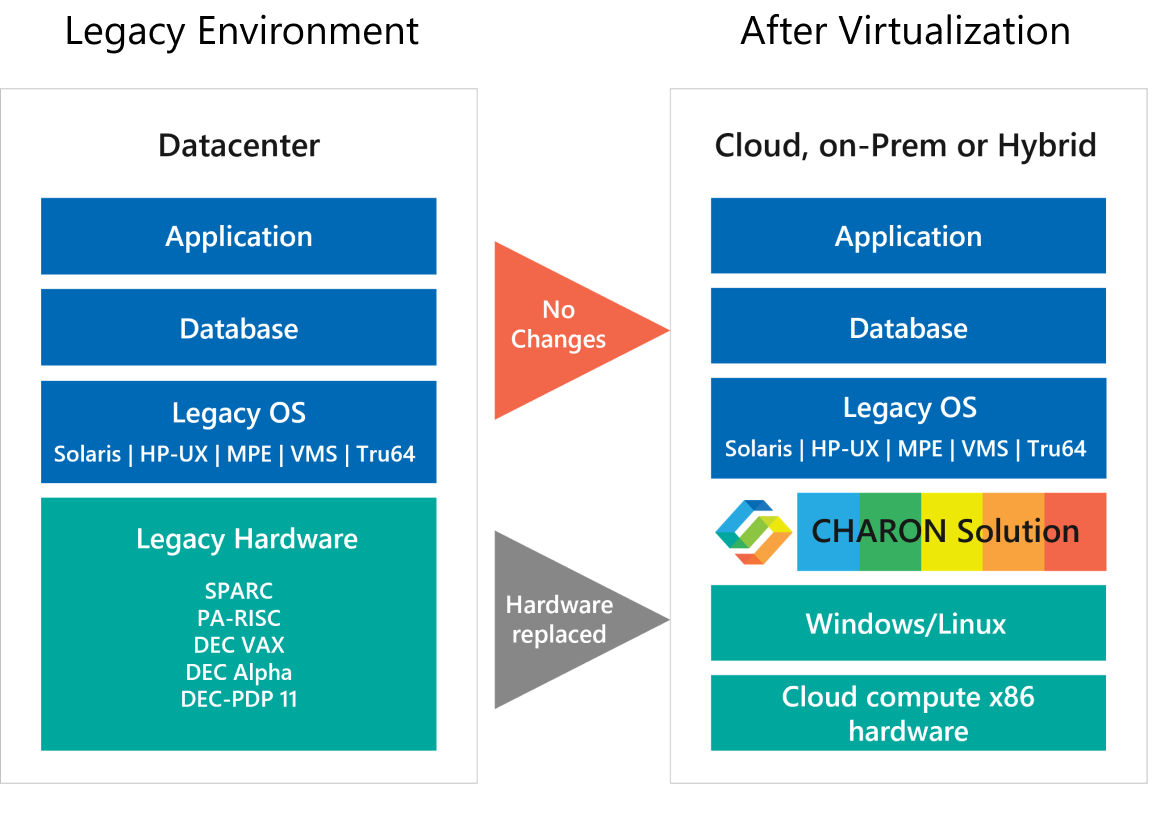
If you want to eliminate any aging hardware dependencies but your critical workloads are still operational, then the Charon solution is a great option to consider. Stromasys is a legacy modernization leader that has catered to many industries. The Charon emulation solution follows the rehosting migration strategy. It mimics the behavior of aging legacy hardware on the new x86 platform or the cloud and migrates the critical workloads to them. This way, the aging hardware dependency is eliminated while the critical apps continue to run without any changes or rewrites.
Legacy IT skills shortage means the increasing gap between the number of professionals who have expertise in legacy platforms. It is mostly due to the fact that critical systems are still operational while the people who maintain them are retiring, taking away decades of knowledge and skills with them.


The IT landscape is rapidly evolving, and businesses still running legacy hardware are facing numerous...
Read More
DEC Alpha hardware has been pivotal to many businesses due to its reliability, performance, and...
Read More
Very often, you notice businesses showcasing limited growth despite several processes to drive innovation. The...
Read More