
×

 How can legacy Unix cloud migration help with moving the critical applications without code changes?
Legacy Unix cloud migration is the process of moving critical applications and workloads that are running on older Unix systems such as Solaris, HP-UX, AIX, or Tru64 to a modern platform. The aging legacy hardware underneath these critical apps has reached its end-of-life. By migrating from them, you can minimize operational risks, eliminate maintenance costs, improve scalability, efficiency, and compatibility with modern applications without any rewrites.
Unix application migration to cloud helps in preserving the existing business logic while allowing you to leverage modern platform benefits. In this process, the original environment is recreated so that existing Unix applications and operating systems can run uninterrupted on a new infrastructure. It is either carried out through hardware emulation pr architecture-compatible cloud instances that include binaries, data, configurations, and batch jobs that continue to run unchanged. For example, if a manufacturer is running their Solaris OS on an outdated SPARC server, then they can migrate to cloud without modifying their Solaris operating systems. With a rehosting migration strategy, they can move their critical apps with zero modifications while eliminating dependence on failing SPARC servers and avoiding operational disruptions.
 Article


Based on the W3Techs 2026 survey report, around 92.1% of websites still operate on Unix operating systems or Unix-based OS. This blog post explains the best proven Unix migration options to the cloud that require zero modifications. You will also explore other migration requirements, what requires your immediate attention, and how to assess your current environment.
Legacy Unix-based operating systems like Solaris, HP-UX, AIX, and Tru64 operate on legacy proprietary hardware like SPARC, Alpha, PA-RISC, and IBM Power systems. These critical workloads have been in operation for more than 2 decades now and still continue to operate seamlessly. But the real challenge is not the legacy applications but their maintenance.
Most of the skilled experts who have experience in legacy Unix have either moved on or retired. As a result, there has been a decline in legacy experts. This results in the decline of legacy experts. While the hardware underneath these legacy applications is aging, the OS vendors are limiting the shipping of patches, and the data center contracts are also up for renewal.
Then there are the challenges regarding poor documentation and missing source code. The third-party libraries, middleware, and compilers may no longer exist in supported form. These applications are located in the core of manufacturing execution, telecom billing, financial batch processing, or utilities SCADA systems. Even planned downtime carries high business risk.
This is one of the most common stories behind most of the legacy migration projects. Based on the GAO Reports, US federal agencies spend more than $100 billion on IT infrastructure annually, and roughly 80% of it goes into operating and maintaining these legacy systems.
But here is the good news: to modernize the legacy systems, rewriting the application is not the only option. The actual question is what workloads are migrated cleanly and what needs to be prioritized first.
Here are some critical components that can be seamlessly migrated without modifications when you are moving your critical apps using the rehosting approach to the cloud.
They are the compiled programs, batch jobs, shell scripts, and cron entries that can run on a new cloud platform without any changes when the new hardware behaves exactly the same as the existing one.
Check the version of the current operating system, configuration, and patch level and see whether they can be moved over intact. This will help in avoiding any unnecessary retesting and recertification that comes with an OS upgrade.
This includes flat files, file systems, and raw database files that can be migrated from existing backups. Here the main constraints are transfer volume, consistency windows, and network bandwidth rather than format conversion of these files.
In most cases, the user accounts, permissions, environment variables, hostnames, and cron tables are migrated seamlessly. The network settings may need minor adjustments depending on the new environment.
TCP/IP, NFS, and most file- or message-based interfaces carry over. Serial devices, proprietary printers, or hardware dongles are the exceptions that may require replacements or special attention.
Here is the list of components that still require attention during a legacy Unix cloud migration even though they remained unchanged.
Some of the existing applications require licensing to host ID, MAC address, or dongle checks. You may be required to check and validate whether they need to be reissued or mapped.
You need to check the performance of the existing applications on the new platform to see whether it meets the original throughput and response time.
You need to check if there is any difference in network latency after the applications and data are migrated from the existing platform to the cloud. You need to assess the behavior of existing workloads and integrations.
Most of the applications behave differently on a network that is attached to storage, as they were previously tuned for local disks. You need to check for any discrepancies that can be surfaced.
You need to work on a plan for managing the serial devices, tape drives, and custom cards as they all align with the existing infrastructure.
Extra testing may be required to validate the real-time or tight-time processes.
Check for any existing vendor support contracts or security requirements that are lacking, especially for regulated industries. Even an unpatched OS still requires better security controls like access restriction, monitoring, and network isolation.
Here are three primary approaches to migrate Unix applications to cloud unchanged:
In the physical-to-virtual conversion, the workloads are migrated to a hypervisor that supports a similar architecture. The effort required is moderate, and it only works when that architecture is still available. It offers limited availability in a cloud environment.
Hardware emulation is a process of transforming legacy systems. The emulators mimic the behavior of existing outdated hardware on a new platform (x86 servers or cloud environments) so that the original OS and applications can run without any modifications.
Here, bare-metal or dedicated cloud instances are used that support the particular architecture. For example, SPARC for Solaris OS or IBM PowerVS for AIX.
Here are some steps you need to take before a Unix-to-cloud migration:
Legacy workloads that will be running on the cloud fall under the shared responsibility. The cloud service provider offers a secure infrastructure, while you will need to be responsible for the guest operating systems, data, and applications. It means migrating to the cloud will not automatically patch an unsupported OS. You will need to plan for proper security measures that include network segmentation, monitoring, restricted access, and tested backups.
While snapshot-based backups and cross-region replication are simpler and faster options than an old tape-or-disk physical recovery process, regulated industries like telecom, utilities, and finance should confirm in the beginning what their expectations from the systems are and choose cloud controls to satisfy audit requirements. A well-planned Unix application migration to the cloud offers modern backup and disaster recovery options without changing the application.
Rewriting applications is not the only option when you want to migrate your legacy Unix to a cloud platform. If your legacy applications are still operational, then the Charon on the Cloud solution from Stromasys can be a great option for you.
It uses the lift-and-shift migration approach to move the critical legacy applications to the cloud. This way, your Unix-based applications and OS can run unmodified at a fraction of the cost of maintaining the aging hardware while improving efficiency and complaint with the latest industry regulations.
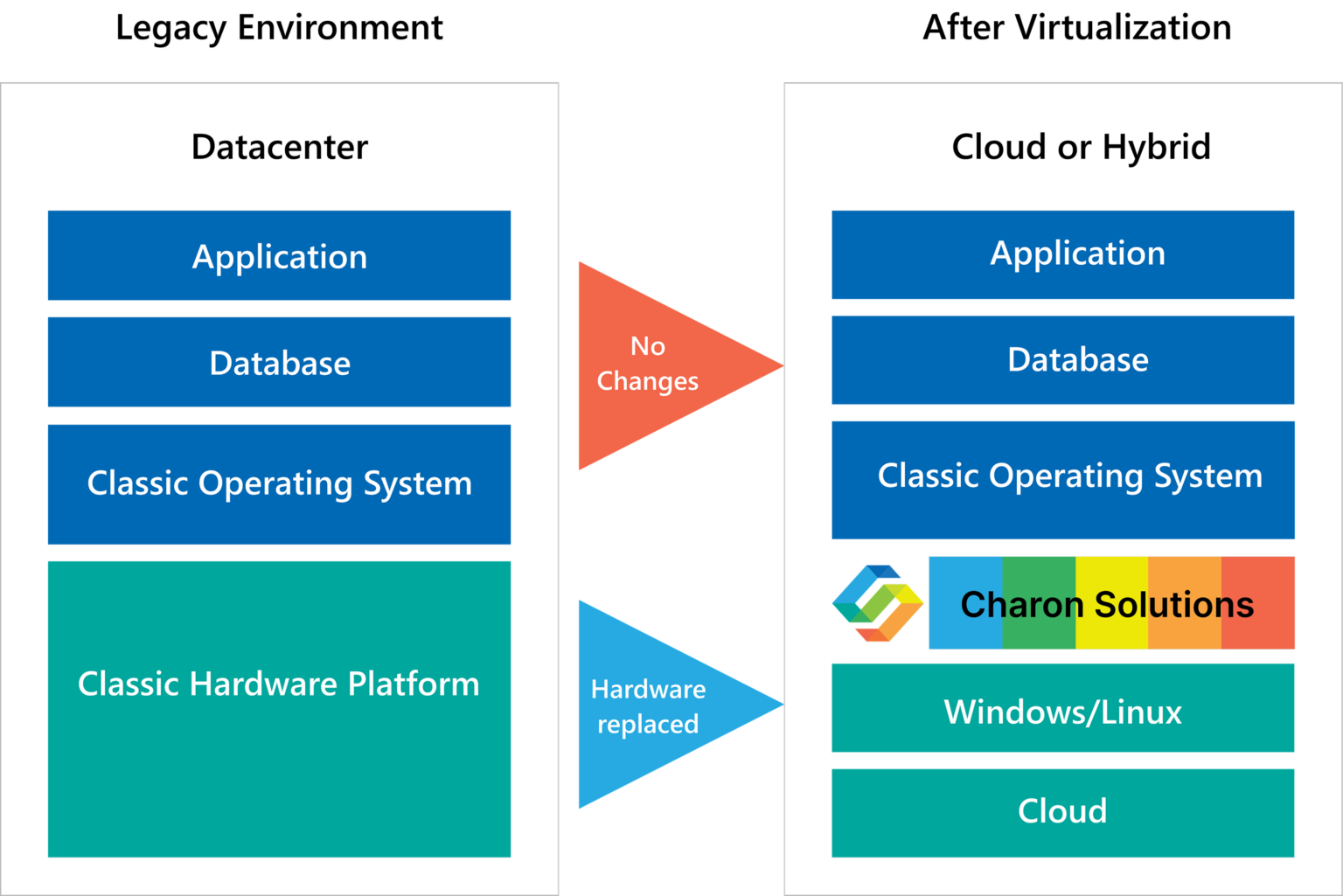
This approach of hardware emulation using lift-and-shift migration is used by several industries like manufacturing, telecom, and finance to migrate critical workloads onto clouds while preserving the exact same application behavior and user experience.
Legacy Unix cloud migration is a process to move the critical Unix applications and operating systems (Solaris, HP-UX, or Tru64) from outdated hardware to cloud environments like AWS, Azure, Oracle Cloud Infrastructure, or Google Cloud. The primary objective is to extend the life of these critical apps as the hardware underneath has become obsolete.


Mergers and acquisitions (M&A) promise business growth and market expansion, but their core value derives...
Read More
Many businesses still rely on legacy systems. This may be due to an investment in...
Read More
Technology is evolving at a faster pace, making it crucial to maintain critical applications stable...
Read More